

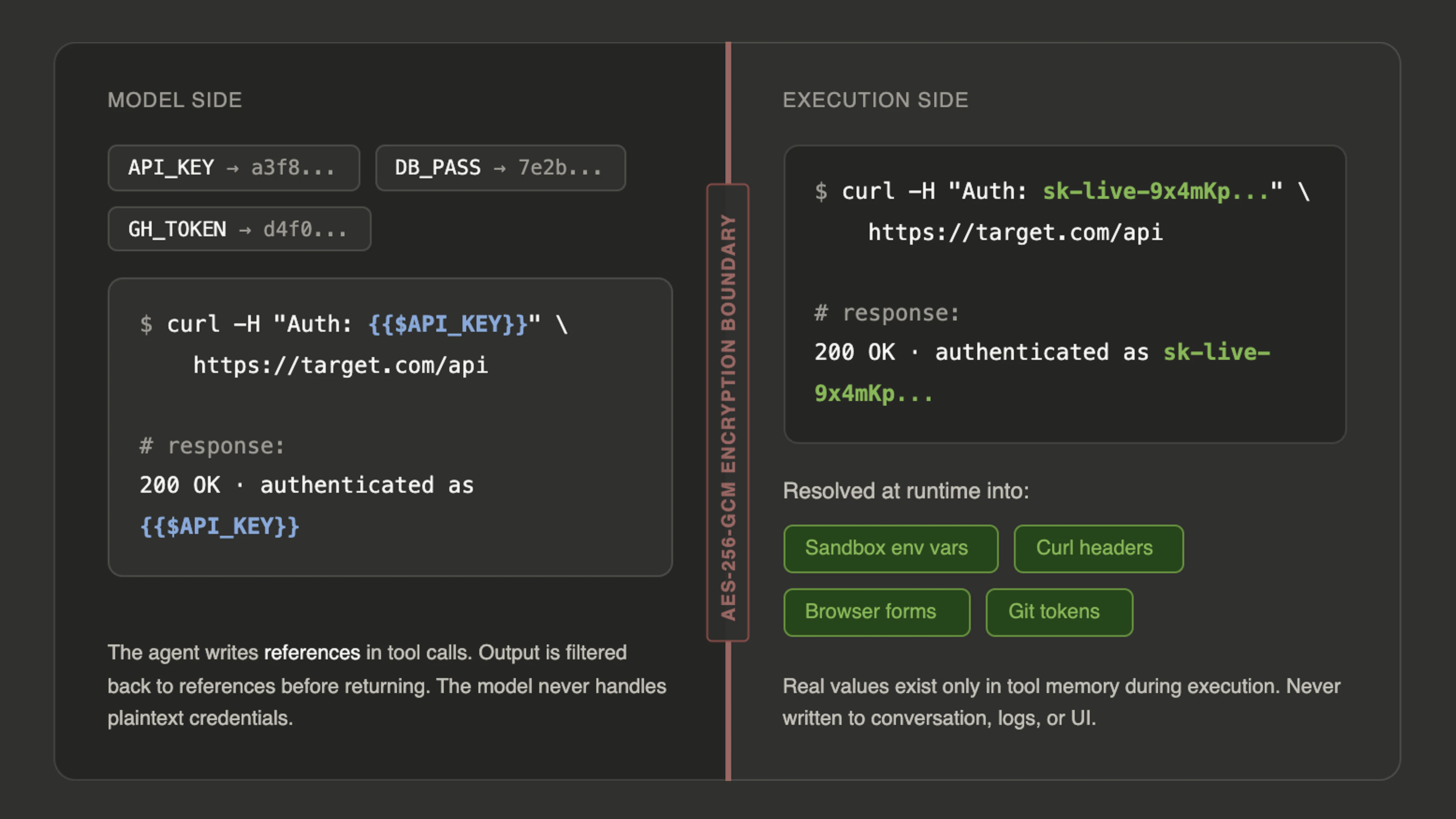
{{$API_KEY}} or {{$DB_PASSWORD}} in its tool calls rather than the actual value. At execution time, the tool resolves the reference to the real credential, performs the action, and returns the result using the original reference in the output. The model never sees, generates, or handles the plaintext secret. If the agent runs a curl command with {{$AUTH_TOKEN}} in a header, the sandbox receives the real token but the conversation shows only the reference.
This resolution happens across all the tools where credentials are needed. Sandbox commands receive your secrets as environment variables, so any script or tool the agent runs can access them through standard environment variable patterns. The curl tool resolves secret references in headers, request bodies, and cookies. Browser tools resolve them in URLs, form inputs, and JavaScript execution, so the agent can log into authenticated applications without the password appearing in the conversation. Codemaps resolve git tokens for indexing private repositories.
You add secrets through the credential vault in the Neo interface. Secrets are created in batch (up to 50 at once), with automatic duplicate detection. If a name like GITHUB_TOKEN already exists, the system auto-renames the new one to GITHUB_TOKEN_2.
Secret names follow uppercase snake case convention (e.g., API_KEY, DB_PASSWORD, STAGING_TOKEN). If you provide a name in a different format, the system sanitizes it automatically.
Secrets have a sticky behavior across conversations. When you select secrets for a task, those selections persist on the thread so subsequent messages in the same conversation continue to have access. Within a project, your own secret selections aggregate across your threads, so new conversations you start in the same project inherit the credentials you used in prior sessions. This means you do not need to re-select your secrets every time you start a new task against the same target.
This aggregation is per user, not per team. A secret you selected in a project is not thereby available to a teammate working in the same project. Sharing a credential with other project members is a separate, explicit step, described in ownership and sharing.
You can also mark secrets as default-available, which means they are automatically injected into every task you run without needing to be explicitly selected. This is useful for credentials you always need, like a personal GitHub token or a cloud provider key. Marking a secret default-available does not expose it to anyone else, including members of a project you share.
For security isolation, some secrets are tool-scoped. Credentials like HackerOne API keys are only accessible to the specific tool that needs them and are filtered out of the sandbox environment variables. For HackerOne, connect your organization API token in Triage as described in the HackerOne integration guide. This prevents them from being exposed through general-purpose commands, even though the agent has root access to the sandbox.
Secrets integrate directly with scheduling. When you create a scheduled task, it inherits the secrets from the session where it was set up. This means recurring security scans against authenticated targets run unattended without any manual credential handling. The secrets are resolved fresh at each execution, so if you rotate a credential, the next scheduled run picks up the new value automatically.
The practical result is that you can hand Neo a target that requires authentication and the agent handles the full workflow securely. It logs in, navigates authenticated surfaces, tests protected endpoints, and reports findings, all while the actual credentials remain encrypted and invisible throughout the entire process.